
Unlimited usage
Unlimited usage
GNU GPL
Package security report
Use the VirusTotal report above to review the latest available scan.
$5.99
?Why is it cheaper?
The price covers independent GPL file access, checks, manual updates when available and Nodub support. It does not include an official vendor license key or vendor support.
Secure checkout. Download access is provided after successful payment.
Important: official vendor keys, official support and automatic vendor updates are not included.
Original GPL package
Original GPL-licensed package files, independently redistributed.
Nodub technical support
Independent help under the published support policy.
Guarantees and safety
Package checks and refund policy subject to published terms.
What the purchase includes
GPL package access, package checks, manual updates when available and independent Nodub support.
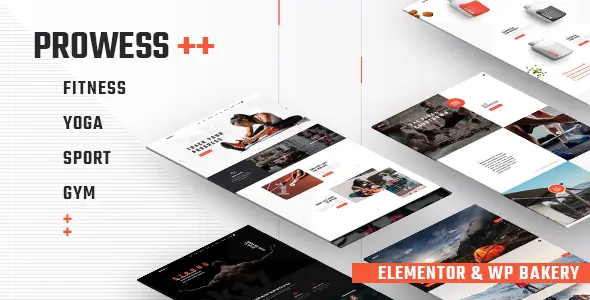
I use Prowess on fitness, gym, yoga, trainer, and class-based sites where the client wants a ready front with schedules, trainer cards, pricing blocks, and WooCommerce stitched in without extra assembly. It is not a minimalist framework theme. It’s a packaged commercial build with its own design system, admin options, demo structure, and bundled plugins.
That’s exactly why it works for small and mid-size projects. You get a site online quickly from the adminka, with fewer layout decisions. But if I know the project will need deep custom PHP logic, headless front work, or a very strict performance budget, I treat it more carefully.
Prowess follows the usual premium theme pattern: theme options in the WP admin, page layouts handled through the bundled builder stack, and theme-specific templates living inside the theme folders. Global design parts like headers, footers, blog layouts, trainer archives, class pages, and WooCommerce styling are mostly controlled by the theme, not by native Customizer alone.
What is editable: colors, typography, layout presets, page sections, headers, footers, and demo pages from the builder UI and theme panel.
What is effectively hardcoded: parts of template logic, custom post type output, some shortcode rendering, and theme-specific assets. If I need to change archive structure or card markup, I usually end up in PHP templates rather than clicking around the builder.
Assets are usually loaded theme-wide: CSS packs, icon fonts, slider files, builder scripts, and Woo styles. On a cache stack, this matters. In DevTools, I check Network for large theme CSS/JS bundles and Console for builder JS errors after minify or delay. The common break is delayed inline dependencies or merged files loading in the wrong order.
The first weak spot is demo import. On cheap hosting, imports fail because of PHP limits, timeout, or blocked remote requests. If demo content stops halfway, I raise memory_limit, max_execution_time, and check whether the host blocks external requests the importer needs. Broken imports often leave half-configured menus, empty sliders, and missing homepage assignments.
The second common issue is optimization plugins getting too aggressive. I’ve seen delayed JS break sliders, sticky headers, tab blocks, class timetables, and Woo fragments. The fastest fix is to exclude theme/builder handles from delay and minify, then retest page by page. In practice I start with:
jquery-corejquery-migrateIf WooCommerce product interactions break, I exclude: wc-cart-fragments
wc-add-to-cart
wc-add-to-cart-variation
Another conflict source is outdated theme overrides for WooCommerce. If the shop page looks off after Woo updates, I check wp-content/themes/prowess/woocommerce/. Old template overrides cause cart markup issues, gallery glitches, and broken notices. The quick path is comparing overridden files against current Woo templates and updating the override layer.
If the site feels heavy on mobile, the real cause is usually not one huge bug but stack weight: demo media, icon packs, Google Fonts, sliders above the fold, and builder sections repeated across pages. My fix is mechanical: disable unused widgets/modules in the theme panel if available, remove redundant sections from templates, convert hero images to WebP, and regenerate cache after each pass.
[virustotal url=”https://www.virustotal.com/gui/file/9186c245b1e47057e812ba03c0074de82745c8f5a1c9b697b9d5ca13cc874609″]
I checked this product personally: Prowess is activated and fully working, without restrictions.
It runs without a license key in this setup. You can install it, import the structure available in the package, and use the theme normally. What you typically lose without official activation is:
Manual update path is standard: upload the new theme ZIP via Appearance → Themes or replace theme files via FTP. Always make a backup first. If you edited the parent theme directly, the update will overwrite those changes. I fix that the normal WP way: move code edits to a child theme, keep CSS snippets out of the parent, and never patch template files without versioning them.

Yes. That’s the exact use case where it makes sense. You get prebuilt fitness layouts faster than assembling the same stack from a bare multipurpose theme.
No. Visual parts are editable from the builder and theme settings, but template structure and some custom post type output are still controlled in PHP files.
Usually hosting limits or blocked remote requests. Check PHP memory, execution time, and whether the host/firewall blocks external importer calls.
They can. JS delay/minify often breaks sliders, sticky headers, and Woo interactions. Start by excluding jquery-core, builder scripts, and Woo variation/cart handles.
You must be logged in to post a review.
Check the documentation first. If the issue remains, describe the exact action, result and error, and attach screenshots without passwords or private data.
You may use the GPL package on unlimited websites, subject to the GPL and any separately licensed assets or hosted services.
A single purchase includes download access for 72 hours. Later downloads require repurchase or active membership. Updates are installed manually.
No. Vendor license keys and services requiring vendor activation are not included.
Nodub provides independent support. Official developer support is not included.
During active access, downloads are not quantity-limited. Fair-use and account-security controls may apply.






Reviews
There are no reviews yet.